


TimeHut - Baby Album
4.41.60K Reviews
App Specs
- Version
- 8.3.6.2
- Updated On
- License
- Free
- Downloads
- 1,000,000+
- Developer
- Bithouse Inc.
- Categories
- Parenting
- Platform
- Android, iOS
Screenshots
 Analysis by AppCompare
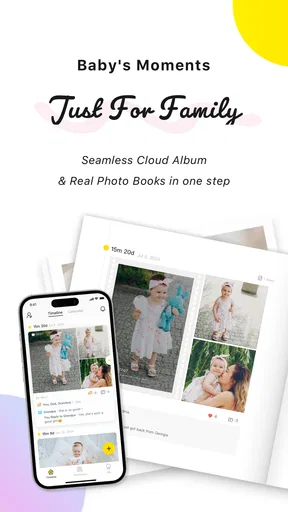
I’d reach for a dedicated baby album when ordinary camera rolls start turning small, meaningful moments into a blur of nearly identical photos. TimeHut - Baby Album is designed around that parenting problem: keeping memories and milestones together so they’re easier to revisit and share. I find that focus appealing, especially for families who want a personal record without posting every moment on social media.
Choosing a home for the everyday moments
At first, the task seems simple: take a photo, then save it somewhere. In practice, a baby’s first months can fill a phone with snapshots, short videos, and details that are easy to forget by evening. A general photo gallery is convenient, but it treats a first smile much like a picture of groceries. A private journal can capture the story, but it may take more effort to connect written notes with the images. TimeHut sits between those approaches, with a baby-focused place for both visual memories and milestones.
I’d consider it when I want a record that can grow with a child rather than a folder I have to sort out later. It is a parenting app from Bithouse Inc., and its long-running presence is reflected in an average rating of 4.4 from around 84,000 ratings. That level of use is reassuring as a sign that many families have found the idea worthwhile, though popularity alone cannot tell me whether its routines suit my own household.
From a new profile to a useful timeline
The workflow starts by creating a profile for the baby, then adding material as moments happen. The useful habit is to attach a little context while the memory is fresh: a photo can show the scene, while a short note can explain why it mattered. A funny expression may look like any other picture months later; a note about what happened just before it gives the image its story.
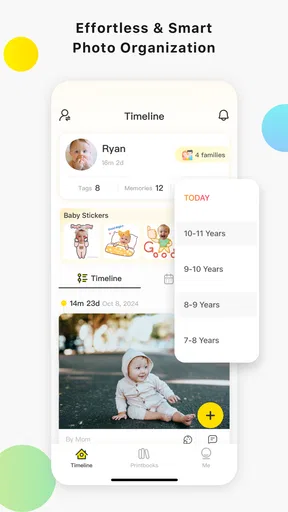
The timeline makes those entries easier to browse as a sequence instead of a pile. I would use it to look back across changing stages, or to find a particular stretch of early development without scrolling through an entire camera roll. A practical tip is to add memories in small batches rather than waiting for a free afternoon to organize everything. That keeps the archive closer to a living diary and makes the task less daunting during a busy week.
Sharing without turning every moment public
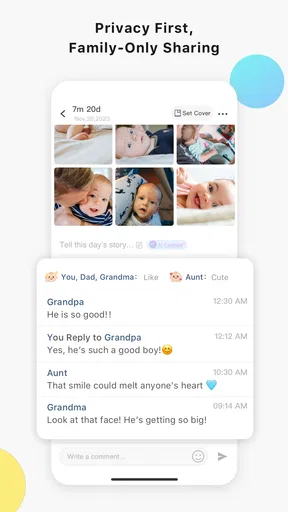
Family updates are another part of the flow. The sharing feature lets a parent choose who sees what, which is more deliberate than sending every photo to a broad social feed. That distinction matters when relatives want regular updates but parents still want to decide which moments stay within a smaller circle.
For example, after a family visit, I could gather a few photos and a milestone into an album or timeline entry, then share the selected material with the people who would appreciate it. That is a more thoughtful handoff than forwarding a stream of images one by one. It can also help relatives who live far away feel included without making the child’s whole life a public announcement.
Worth Reading Before You Choose

Flipboard Shows What News Apps Must Do Beyond the Feed

Switching to Android Auto Means Rethinking Your Driving Routine

Google Calendar Makes a Crowded Week Easier to Manage

Ludo King Makes the Most of the Minutes Between Plans

Baby Panda World Brings Quick Play to Modern Phones, but Its Game Library Feels Busy

ESPN’s Live Game View Makes Following Close Games Easier
What the app does well—and where expectations matter
The timeline, milestone tracking, quick photo editing, and customizable albums give the app several ways to make memories easier to revisit. Albums can separate occasions such as holidays from everyday snapshots, while milestones give parents a simple prompt to record events they might otherwise remember only vaguely. I would treat those tools as memory aids, not as a substitute for a medical record or a formal child-development assessment.
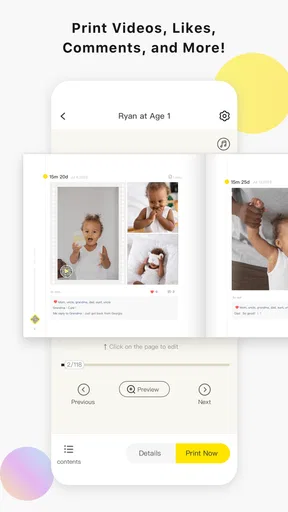
There are trade-offs. A dedicated album asks parents to maintain another place for photos, so it may feel like extra work if the camera roll already has a consistent system. The original review also points to a desire for more album-layout choices and broader platform integrations. If your priority is arranging images with highly specific design controls, a general photo-book or editing tool may fit better; if your priority is a chronological parenting record, this app’s emphasis makes more sense.
It is free to download, with in-app purchases ranging from $0.99 to $99.99 per item. I’d look at the available purchase options before building a routine around anything that might require payment, and decide whether the free experience already covers the way I plan to use it. It is rated for Everyone, but that age label is not a privacy guarantee; parents should still be thoughtful about what they add and who they share it with.
The app has been available since September 21, 2012, and its current version is 8.3.3.1, with Android 7.0 as the minimum operating-system requirement. It has over one million installs. Those details suggest it is an established option rather than a newly launched experiment, but I would still check that my device can run it and that the current experience suits my preferences before committing to it as the family archive.
All Your Memories in One Place
When I first stumbled upon TimeHut - Baby Album, I was immediately intrigued by its promise to keep all those precious memories organized. The initial setup is super simple. You create a profile for your baby, and voilà, you’re ready to start saving those moments.
The interface is clean and intuitive, perfect for sleep-deprived parents who need things straightforward. You can add photos, videos, and even jot down those hilarious first words or quirky habits. It’s like having a personal time capsule for your child.
Features That Stand Out
One of the coolest features has to be the timeline view. It lets you scroll through your baby’s growth, literally. You can see how your baby has transformed from that tiny newborn to a curious toddler. It’s heartwarming and a little emotional, honestly.
The app also offers a sharing feature, allowing you to keep family and friends in the loop without flooding your social media. You can select who sees what, which is a nice touch if you want to keep some moments private.
- Milestone Tracker: Keep tabs on when your baby first smiled, crawled, or said "mama."
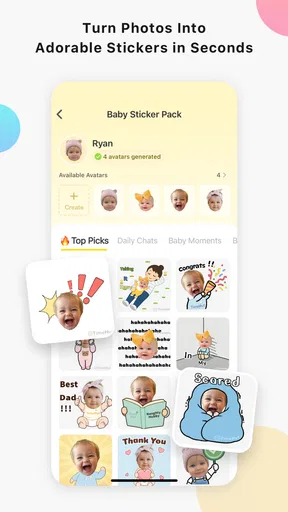
- Photo Editor: Quick edits to make those photos pop without needing another app.
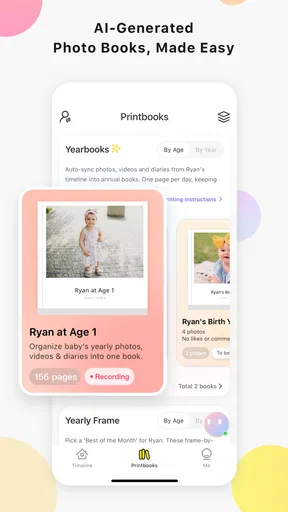
- Customizable Albums: Create albums for different occasions, like birthdays or holidays.
Why You'll Love It
As a parent, it’s easy to get overwhelmed with the sheer number of photos and videos you take. This app helps keep things organized and manageable. Plus, the ability to look back at your child’s development is priceless. It’s not just about preserving memories; it’s about reliving them whenever you want.
Another thing that I appreciate is the security. The app promises to keep your data safe, which is a big deal when dealing with personal and sensitive moments.
Room for Improvement
While TimeHut - Baby Album is a fantastic tool, there are a few areas where it could get even better. For instance, the app could benefit from more customization options for album layouts. And while the sharing feature is great, having more integrations with other platforms could offer more flexibility.
Additionally, a growth tracker feature that includes weight and height could make the app even more comprehensive.
Final Thoughts
In a nutshell, TimeHut - Baby Album is a delightful app for parents who want to capture every little moment of their child’s early years. It’s user-friendly and packed with features that make documenting life easier and more enjoyable.
So, if you’re looking for a way to keep all those special moments safe and sound, give this app a try. You might just find it becomes one of your favorite parenting tools.
Making the routine stick
The best use case, in my view, is not documenting every single diaper change or ordinary afternoon. That would turn a warm keepsake into another chore. Instead, I’d use the app for a few images that tell the story of a week, paired with the occasional milestone or note. On a hectic day, I could save a photo quickly and add context later, then make a short catch-up pass when the house is quiet. That small workflow gives the timeline shape without demanding constant attention.
It also works well as a handoff between caregivers. If one parent takes most of the photos and another wants to help preserve memories, a shared set of selected entries can make the record feel like a family project. Before relying on sharing, I’d agree on who should see the album and what kinds of moments belong there. The app’s selective sharing is useful, but the family still needs its own boundaries.
Who will get the most from it
I’d recommend trying it if you enjoy recording milestones, want relatives to see chosen updates, or find your phone’s gallery too chaotic for a child’s story. It is particularly suited to parents who value a chronological record and are happy to add short notes alongside photos. The album format can also be useful when looking for a specific occasion later, rather than searching through unrelated screenshots and everyday pictures.
I would skip it if you already have a reliable family photo workflow and do not want to maintain a second archive. It is also not the right tool for someone seeking detailed height-and-weight tracking, since the original review identifies that as a feature it would benefit from adding. For precise growth records, a dedicated tracking tool or a clinician’s recommended method is a better fit; for polished printed layouts, a photo-book service is more appropriate.
Keeping a personal archive manageable
One non-obvious trade-off with any baby album is that choosing what not to save matters as much as adding everything. A focused collection is easier to revisit and share. I’d reserve the timeline for images and notes that carry a memory, use occasion albums when a group of photos belongs together, and avoid treating it as a duplicate backup unless I have confirmed that it meets my storage needs. Keeping a separate copy of particularly important photos is sensible for any single-app archive.
Privacy deserves the same deliberate approach. Sharing with selected people is preferable to posting broadly, but I would still pause before including details that make a child’s routine or location obvious. I’d also review the audience when circumstances change, such as when a family member no longer needs access. Those habits are more useful than assuming a privacy-focused feature makes every choice automatic.
A practical fit, not a complete parenting record
Compared with a standard gallery, TimeHut gives memories more context through milestones, notes, and a child-centered timeline. Compared with a private social group, it is more organized around preserving a record than keeping up a conversation. Compared with a journal, it gives photos and videos a prominent role. That balance is its main appeal, but it also means it is not a universal solution: people who want extensive family discussion, advanced image design, or health measurements may prefer separate tools.
My overall view is that this is a thoughtful option for parents who want a gentle, organized place for the moments that deserve more than a spot in the camera roll. I’d start with a few meaningful entries and see whether the timeline becomes a habit, rather than trying to move an entire photo library at once. If that simple routine feels natural, the app can become a satisfying record of a child’s early years; if it feels like another task, a basic gallery and occasional printed album may be the better choice.
Pros
- Intuitive and user-friendly interface.
- Seamless photo and video uploads.
- Customizable milestone tracking.
- Secure cloud storage options.
- Real-time family sharing capabilities.
Cons
- Limited editing tools for media.
- Requires subscription for full features.
- Occasional app crashes reported.
- No offline access to albums.
- High storage usage on devices.
FAQs for TimeHut - Baby Album
What is TimeHut - Baby Album and how does it work?
TimeHut - Baby Album is an intuitive app designed to help parents capture and organize precious moments of their child's early years. It allows users to create a digital album, add photos and videos, and chronicle milestones. The app features a user-friendly interface, making it easy to navigate and customize your baby's album with captions and notes.
Does TimeHut - Baby Album offer any privacy features for my child's photos?
Yes, TimeHut - Baby Album prioritizes user privacy by offering several security features. You can set up a password or biometric lock to access the app. Additionally, the app allows users to control who can view and share the content, ensuring your child's photos are kept private and secure.
Can I share my baby's album with family and friends through TimeHut?
Absolutely! TimeHut - Baby Album offers seamless sharing options. You can share individual photos, videos, or entire albums with family and friends via email or social media. The app also provides options to create digital invitations for special events or milestones, enhancing the sharing experience.
Is TimeHut - Baby Album available on both Android and iOS platforms?
Yes, TimeHut - Baby Album is available for download on both Android and iOS platforms. The app is optimized for various devices, ensuring a smooth user experience. You can find it on the Google Play Store for Android devices and the Apple App Store for iOS devices, with regular updates to enhance functionality.
Are there any in-app purchases or subscriptions required for TimeHut - Baby Album?
TimeHut - Baby Album offers a free version with basic features. However, to unlock additional functionalities such as extra storage, premium filters, and advanced editing tools, users can opt for in-app purchases or a subscription plan. These options provide enhanced capabilities to further customize and expand your baby's album.


